Most advertisers think call tracking in Google Ads is a single toggle, but missing one tiny step can silence all your call data. Below is the exact checklist you need to get every inbound call logged, measured, and ready for optimization.
Step 1: Create or Confirm Your Google Ads Account
The first thing you need is an active Google Ads account. If you already run search or shopping campaigns, you can skip the sign‑up and move on. Otherwise, head to the Google Ads homepage, click “Start now,” and follow the prompts to set up billing and your first campaign.
When the account is live, double‑check that you have admin access. Only admins can toggle call reporting and add conversion actions. If you’re working with an agency, consider partnering with a top Google Ads management agency in Cleveland, which can grant you admin rights so you can verify each setting later.
Long Weekend’s managed‑PPC service handles this step for you, so you never have to hunt for the right login.
Step 2: Enable Call Reporting and Detailed Call Settings
Turn on call reporting at the account level. In Google Ads, go to Settings > Call reporting and toggle “Get detailed information about calls you’ve received.” This activates Google forwarding numbers, which replace the phone number shown in your ads.
When a prospect dials the forwarding number, Google routes the call to your real line and records duration, caller area code, and click‑through data. You’ll see these metrics in the “Calls” tab of your campaign reports.
Note that call reporting works for call‑only ads, call extensions, and location assets. If you prefer to show your direct business number, you can turn the feature off, but you’ll lose call‑level attribution.
For a deeper dive on why forwarding numbers matter, ing documentation. It explains how the unique number tracks each call back to the exact ad click.
Step 3: Verify and Set Up a Google Forwarding Number
Google automatically assigns a forwarding number if your campaign targets a geographic location that supports it. To confirm, open any active ad, click the phone icon, and note the number displayed. If the number looks unfamiliar, that’s the forwarding number in action.Make sure your business phone line can receive calls from any area code. Some regional carriers block unknown numbers, which would prevent Google from routing the call.
Once you verify the number works, test it yourself. Call the forwarding number from a mobile device, then check the call report in Google Ads. You should see the call listed with a duration and the originating keyword.
If you need help with verification or troubleshooting, Long Weekend can run a quick audit and fix any routing issues.
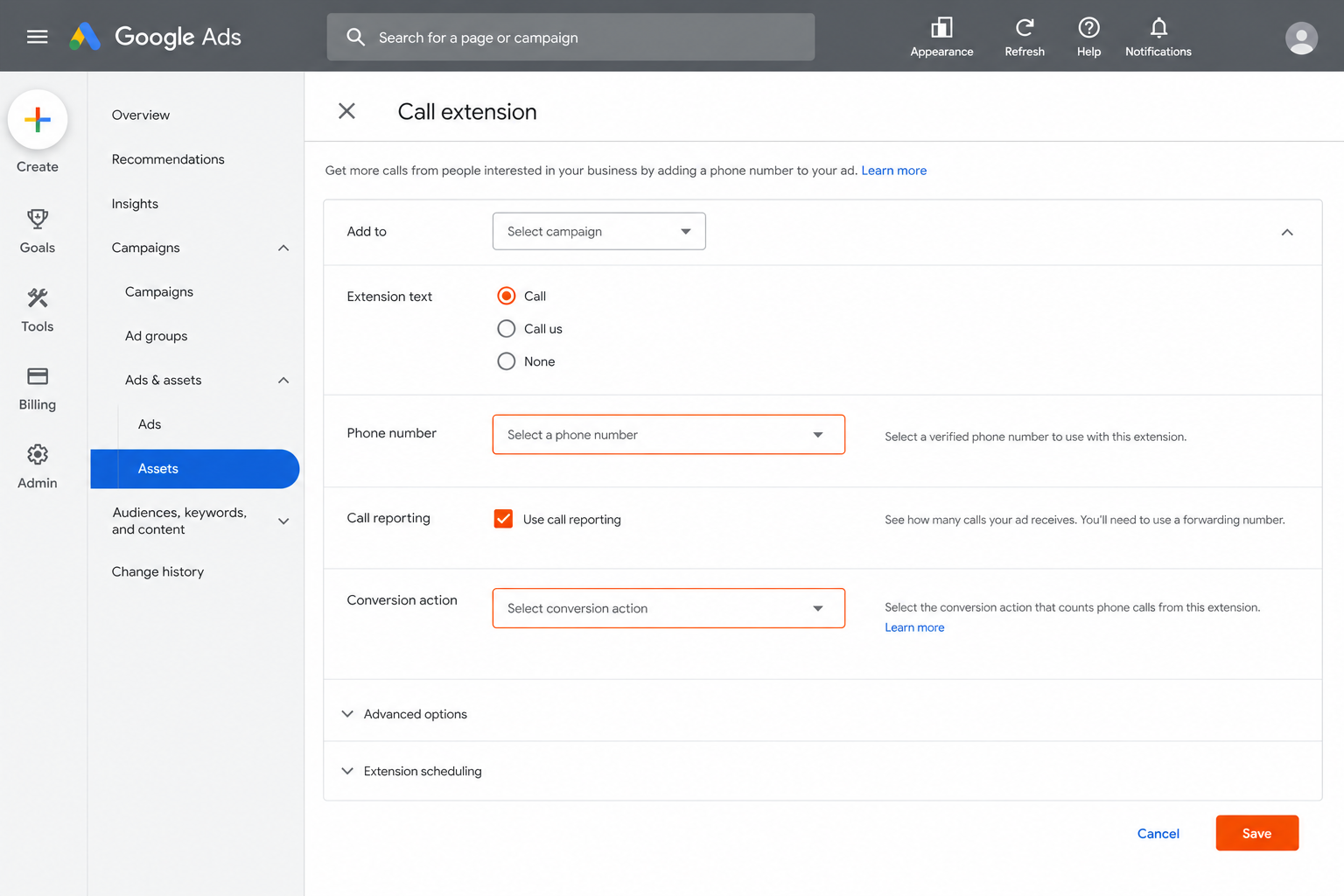
Next, attach a call extension to each campaign that you want to track. In the left navigation, select Ads & extensions, click “+,” and choose “Call extension.” Enter your business phone number, then select the Google forwarding number you verified earlier.
After the extension is live, set up a conversion action to count calls as conversions. Go to Tools & Settings > Conversions, click “+,” and follow the “Select call conversion tracking method” guidance: track calls as conversions either by AI‑analyzed call recordings or by counting calls that exceed a set minimum duration. Enable call recording or set the minimum call duration in the conversion settings, and name the conversion “Ad‑Generated Call.”
Make sure the “Include in ‘Conversions’” box is checked so the call data feeds into automated bidding strategies.
For a quick reference on how Google defines a call conversion, see the official help page official help page. It lists the exact steps for both ad‑click and website‑click calls.
Step 5: Enable Call Recordings and (Optional) Import Calls from Third‑Party Platforms
If you want AI‑powered lead quality analysis, turn on call recordings. In the same Call reporting section, toggle “Record calls” and accept the supplemental terms. Recorded calls will be stored for up to 30 days and can be reviewed in the “Call details” report.
Recording is limited to eligible accounts in the U.S. and Canada. If your business operates elsewhere, you’ll see the option greyed out.
Many advertisers also use third‑party platforms like CallRail to capture calls that happen outside of Google Ads (e.g., on a direct website number). Google Ads subscription service with call tracking can simplify the integration and reporting. To import those calls, create an “Import calls” conversion action in Google Ads and upload a CSV file via the API or the UI. The file must contain the caller’s phone number, the call start time, and the Google Click ID (GCLID) if you have it.
Developers should set the partial_failure flag to true when using the UploadCallConversions API; otherwise a single bad record aborts the whole batch.
Long Weekend can handle the entire import pipeline, from CallRail integration to CSV upload, so you stay focused on closing sales.
FAQ
Do I need a separate Google Ads account just for call tracking?
No. Call tracking works within any existing Google Ads account as long as you have admin access to enable call reporting and add conversion actions.
Can I track calls from my website’s phone number, not just the ad?
Yes. Add a phone‑snippet to your site’s HTML to replace the displayed number with a Google forwarding number, then set up a “Calls from website” conversion action in the Conversions menu.
What minimum call duration should I set for a conversion?
Most advertisers use 30 seconds, but you can adjust the threshold based on what counts as a qualified lead for your business.
Are call recordings available worldwide?
Call recordings are only available for eligible accounts in the United States and Canada. Outside those regions you’ll see the option disabled.
How do I see which keyword generated a call?
When call reporting is on, the Call details report shows the exact keyword, ad group, and campaign that led to each call.
Can I import calls from a platform like CallRail?
Yes. Create an “Import calls” conversion action, format your CSV with the required fields, and upload it via the Google Ads UI or API.
Ready to stop guessing which ads drive phone leads? Let Long Weekend set up and manage your call‑tracking pipeline so you can focus on closing deals. Top 10 Proven Ways to Get More Leads for Your Small Business shows why accurate tracking matters, and our team can implement every step for you.
Start today by reaching out for a quick audit. We’ll verify your account, enable reporting, and get your first call logged within 48 hours.
Looking for the right digital marketing agency for your business — one that drives measurable ROI? Long Weekend helps service businesses, SaaS, ecommerce brands and more — grow with expert SEO, AI Search, Google Ads (PPC) management, paid social ads, website design, and more.